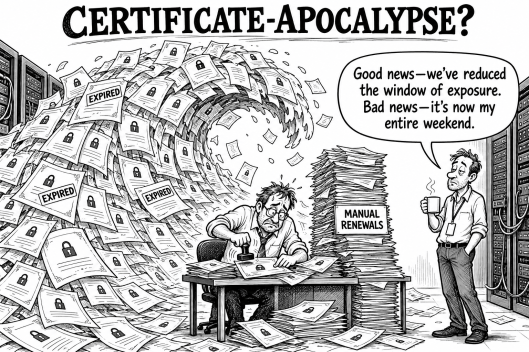
Are we heading to a Certificate-apocalypse?
Most engineers are probably aware of the shortening life span of TLS certificates. this year certificate
Altro...
Are we heading to a Certificate-apocalypse?
Most engineers are probably aware of the shortening life span of TLS certificates. this year certificate
Altro...Are we heading to a Certificate-apocalypse?
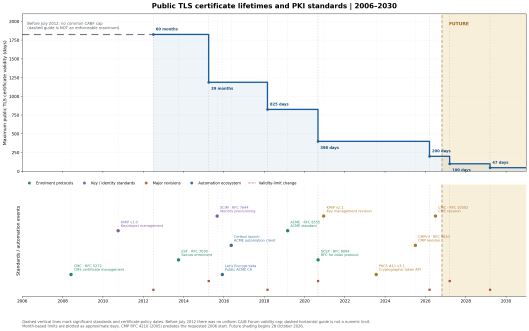
Most engineers are probably aware of the shortening life span of TLS certificates. this year certificate maximum life drops from 398 to 200 days. But what may not have registered is that the roadmap sees the max certificate time will continue to half every year. This means that by 2029 certificate lifecycle will be down to 47 days (31 days (core duration) + core duration/2 days + 1 day). But before 2029, in less than six months we’ll see the current certificate durations half from 200 to 100 days. As with the 2026 change, the new limits come into effect on the 15th March. Which does create an odd situation where certificates issued on the 14th March will outlast certificates issued on the following day.
The addition of half the core duration period is to allow for the recovery from failures. as of 2029 the expectation is every month the certificates should be rotated.
https://blog.mp3monster.org/wp-content/uploads/2026/10/image-2.pngManual processes are unsustainableThis means that the rotation of certificates has got to be accelerated to be monthly, a velocity that is simply not practical to be done by hand. This means the deployment of certificates really needs to be automated. There are a number of frameworks and standards that support the distribution of certificates.
Perhaps the best known and leading solution has been ACME protocol working in conjunction with Let’s Encrypt CA. The least known is the use of OpAMP also supports certificate distribution. The following table shows the different standards that specifically address certificate management (CLM), some implementations are linked to a Certificate authority , others are not.
StandardSpecificationOpen-source implementationsCommercial implementationsACMERFC 8555Certbot (client), acme.sh (client), lego (client), step-ca (server), Boulder (server)DigiCert, Sectigo, GlobalSign, EJBCA EnterpriseCMP / CMPv3RFC 9810EJBCA Community, Bouncy Castle (library)EJBCA Enterprise, DigiCert Trust Lifecycle ManagerESTRFC 7030Cisco libEST (client/server library), EJBCA Community (edition-dependent)EJBCA Enterprise, DigiCertSCEPRFC 8894MicroMDM SCEP, EJBCA CommunityMicrosoft Intune, EJBCA Enterprise, DigiCertCMCRFC 5272Dogtag PKICommercial implementations are less prominent; verify explicit CMC support and supported operations with individual PKI vendorsTo understand the differences between the different standards, it is worth looking at the standards from the perspective of the operations that are needed to manage certificates.
FunctionACMECMPESTSCEPVendor
CLM APICertificate issuanceYesYesYesYesUsuallyCertificate renewalYesYesYesYesUsuallyCertificate revocationYesYesNo native operationLimitedUsuallyCA certificate rolloverLimitedYesYesLimitedVariesCentral certificate inventoryNoNoNoNoUsuallyOwnership / application mappingNoNoNoNoVariesPolicy managementLimitedLimitedLimitedLimitedUsuallyApplication deploymentNoNoNoNoVendor-specificApplication activationNoNoNoNoThrough integrationsDeployment verificationNoNoNoNoVariesYou’ll note that the deployment, activation and verification steps fall into the domain of vendor solutions, and are variable. However we can address such considerations in an open-source (or commercial) manner through tooling such as Puppet, Chef and certain payload types provided by OpAMP.
These CLM options aren’t the end of the story as you may wish to look more broadly at no just the request and distribution of certificates, but the mechanisms through which the certificate is stored, and there is an overlap with such management with keys as well as certificates. For example APIs may use keys of certificates to help verify authenticity of the request. This also extends to mTLS operations where the client needs certificate to verify the server requests. For example KMIP provides an interface that can support cryptographic object (keys, certificates (public, private, symmetric), secret data, PGP Keys).
StandardSpecificationOpen-source implementationsCommercial implementationsKMIPOASIS KMIPPyKMIP (Python client/server)HashiCorp Vault Enterprise, Thales CipherTrustPKCS#11PKCS#11 v3.1SoftHSM, OpenSCHashiCorp Vault Enterprise, Thales Luna HSMSCIMRFC 7644elimity SCIM (Go library)Microsoft Entra ID, OktaManaging the impactThere are several impacts that need to be considered:
tracking certificate expiry
Last mile from client deployer to server folder and any refresh nudge required
Tracking certificate expiryTraditionally certificate expiry management could be handled as a manual process – after all if you have a log of which systems had certificates then if you simply reviewed the list once a month, you could spot expiries with time to spare. Even if the certificate distribution process was automated across many nodes. This just isn’t going to work, and the contingency time incorporated into the certificate life is contracting. Rather than trusting to a tracker spreadsheet being managed we should really focus on actual certificate data. This points to having a means by which application observability has a reporting metric on when a certificate will expire (date or a number of days). The later will prove to be easier as a metrics measure, but the value needs to be in context of when the metric was collected.
Last mile challengeWhile automation frameworks like Certbot and step-ca can drive the certificate issuance. These processes get the certificate to the relevant server. But we still need to move the certificate intro the location the application expects the certificate to be, and do we need to nudge the server to reload the certificate? Certbot for example expects to have a script to trigger for this action. This can get a little messy to deploy and maintain, particularly if there are subtle variances in deployments (as a result of manual application deployment in legacy environments), configuration creep etc. One possible way to simplify this is to leverage the capabilities of environment scanners to locate apps and their configs. Then use that to drive the auto creation of that last mile.
Why the change?The history for the reduction has largely been driven by browser providers particularly Google and Apple, and their security concerns about the trustworthiness of the web’s public key infrastructure (PKI). Historically, certificates could remain valid for several years, creating a prolonged window of exposure if a private key was compromised, a certificate incorrect certificates being wrongly used (organization or domain information became outdated – fore example domain name changes, acquisition of services etc). Certificate revocation mechanisms, particularly CRLs and OCSP, have not proven to be reliable as a means of ensuring browsers quickly stop trusting compromised certificates. Shorter lifetimes reduce this exposure and encourage the automation of certificate management.
The driving of changes has shifted from browser providers unilaterally declaring they won’t trust certificates that are older than a certain age, to a more formalized process governed primarily by the CA/Browser Forum, (an independent body bringing together Certificate Authorities and browser vendors).
Useful resourcesA/Browser Forum — TLS Baseline Requirements, version 2.3.1 (4 October 2026), section 6.3.2. Authoritative current hard limits: 398 days before 15 March 2026; 200 days from that date; 100 days from 15 March 2027; 47 days from 15 March 2029. Section 1.1 and the revision history identify 1 July 2012 as the original effective date. https://cabforum.org/working-groups/server/baseline-requirements/requirements/
CA/Browser Forum — FAQ for Baseline Requirements. Historical summary of the 60-month limit from July 2012 and the 39-month general limit from April 2015. This is a historical source, not the current rule set. https://cabforum.org/faq-about-the-baseline-requirements/
CA/Browser Forum — Ballot 193: 825-day Certificate Lifetimes (17 March 2017). Establishes the March 2018 transition to 825 days; also records the preceding 39-month rule and the qualifying 60-month legacy exception through June 2016. The page contains amendment markup; read the replacement wording in context. https://cabforum.org/2017/03/17/ballot-193-825-day-certificate-lifetimes/
Apple — About upcoming limits on trusted certificates. Announces the 398-day maximum for public TLS server certificates issued on or after 1 September 2020 and explains its scope. This change originated in browser/platform trust policy. https://support.apple.com/en-us/102028
CA/Browser Forum — Ballot SC081v3: Introduce Schedule of Reducing Validity and Data Reuse Periods (11 April 2025). Records the successful vote for the 2026–2029 reductions; source 1 confirms the resulting current requirements. The April milestone is the vote result, not the end of the subsequent intellectual-property review period. https://cabforum.org/2025/04/11/ballot-sc081v3-introduce-schedule-of-reducing-validity-and-data-reuse-periods/
IETF Datatracker — draft-barnes-acme-00 (28 January 2015). First revision of the ACME Internet-Draft, before working-group standardization. https://datatracker.ietf.org/doc/draft-barnes-acme/00/
Let’s Encrypt / ISRG — Entering Public Beta (3 December 2015). Announces public availability without invitations. https://letsencrypt.org/2015/12/03/entering-public-beta
Electronic Frontier Foundation — Announcing Certbot: EFF’s Client for Let’s Encrypt (May 2016). Explains the rename, the EFF home, and ACME-based issuance and configuration automation. https://www.eff.org/deeplinks/2016/05/announcing-certbot-new-tls-robot
Let’s Encrypt community — New name (Certbot) for Python Let’s Encrypt client (12 May 2016). Dated contemporary announcement linking to EFF’s announcement; supports the exact event date. https://community.letsencrypt.org/t/new-name-certbot-for-python-lets-encrypt-client/15688
RFC Editor — RFC 8555: Automatic Certificate Management Environment (ACME), March 2019. Standards-track specification, published as a Proposed Standard. https://www.rfc-editor.org/info/rfc8555/
ACME — RFC 8555: Automated Certificate Management Environment; supports automated certificate issuance, renewal and revocation.
CMP / CMPv3 — RFC 9810: Certificate Management Protocol; supports PKI enrolment and certificate lifecycle operations.
CMP over HTTP — RFC 9811: Defines HTTP transport for CMP messages.
EST — RFC 7030: Enrollment over Secure Transport; supports certificate enrolment and re-enrolment over HTTPS.
SCEP — RFC 8894: Simple Certificate Enrolment Protocol; commonly used for network devices.
CMC — RFC 5272: Certificate Management over CMS; supports certificate requests and management messages. Updated to — RFC 10002: Updated specification superseding RFC 5272.
KMIP 2.1 — OASIS KMIP 2.1 Specification: Key Management Interoperability Protocol; manages cryptographic keys, certificates and other cryptographic objects.
PKCS#11 3.1 — OASIS PKCS#11 3.1 Specification: Cryptographic Token Interface; standard API for accessing cryptographic hardware and software tokens.
SCIM 2.0 — RFC 7644: System for Cross-domain Identity Management; supports identity and account provisioning rather than certificate management.
SPIFFE — SPIFFE Specifications: Secure Production Identity Framework for Everyone; standardizes workload identity across heterogeneous systems.
X.509-SVID — X.509-SVID Specification: Defines X.509 certificates used for workload identity and authentication.
X.509 PKIX — RFC 5280: Defines the Internet X.509 public key certificate and Certificate Revocation List (CRL) profile.
CA/Browser Forum Baseline Requirements — Current Baseline Requirements: Industry requirements governing publicly trusted TLS certificate issuance, domain validation, security practices and maximum certificate validity periods.
#AI #certbot #certificates #Cloud #cybersecurity #Security #Technology #TLS